

Most company blogs grow like a junk drawer. Posts pile up under loose categories, several of them chase the same keyword, and search engines are left to guess which page matters. A pillar page strategy fixes that by giving each broad topic one main page of pillar content and a set of supporting pages that link to it. This guide covers what a pillar page is, how it differs from cluster pages and hubs, the types you can build, and how to plan, write, interlink, and measure one that ranks.
Key takeaways
- A pillar page is a long resource on a broad topic that links out to cluster pages, so readers and search engines can see how your content on that topic fits together.
- The pillar, the cluster content, and the hub each do a different job. The pillar is the core page, cluster pages cover subtopics in more detail, and the hub is the linked structure that ties them together.
- Strong pillar pages match search intent, target one clear primary keyword, and use internal links on purpose to establish topical authority.
- Building your first pillar page takes four stages: pick the topic, map the cluster content, interlink everything, and keep improving it with analytics.
What is a pillar page in SEO?
A pillar page is a long, high-level page that covers a broad topic from end to end and links to more specific cluster pages. It is the center of a topic cluster (some teams say pillar post or cornerstone content). It shows search engines how your site is organized and that you cover a particular subject in depth.
Most pillar pages run long because they touch every subtopic briefly and leave the depth to cluster articles.
It helps to separate four terms that get used interchangeably:
- A content pillar is the theme, such as “content marketing.”
- A pillar page is the main page you publish on that theme.
- Cluster content is the set of supporting articles that go deep on each subtopic.
- A topic cluster is the whole system: the pillar plus its clusters, linked together in a hub-and-spoke pattern.
For each core topic, a pillar page usually targets one primary keyword with real search volume and more than one intent behind it. A SaaS company might publish “Customer Data Platform (CDP): Complete Guide” as the pillar, then write cluster pages on CDP implementation, CDP vs. DMP, CDP use cases by industry, and CDP integrations.
How is a pillar page different from a cluster page or a hub?
A pillar page gives a broad overview of a topic. A cluster page covers one narrow subtopic in more detail. A hub is the linking structure that connects them. Cluster content means focused pages that target narrower search intent and long tail keywords related to the pillar topic.
The hub is the linking pattern itself. The pillar sits at the center, cluster pages are the spokes, and links between related pages complete the network. A hub is a structure, not a single page.
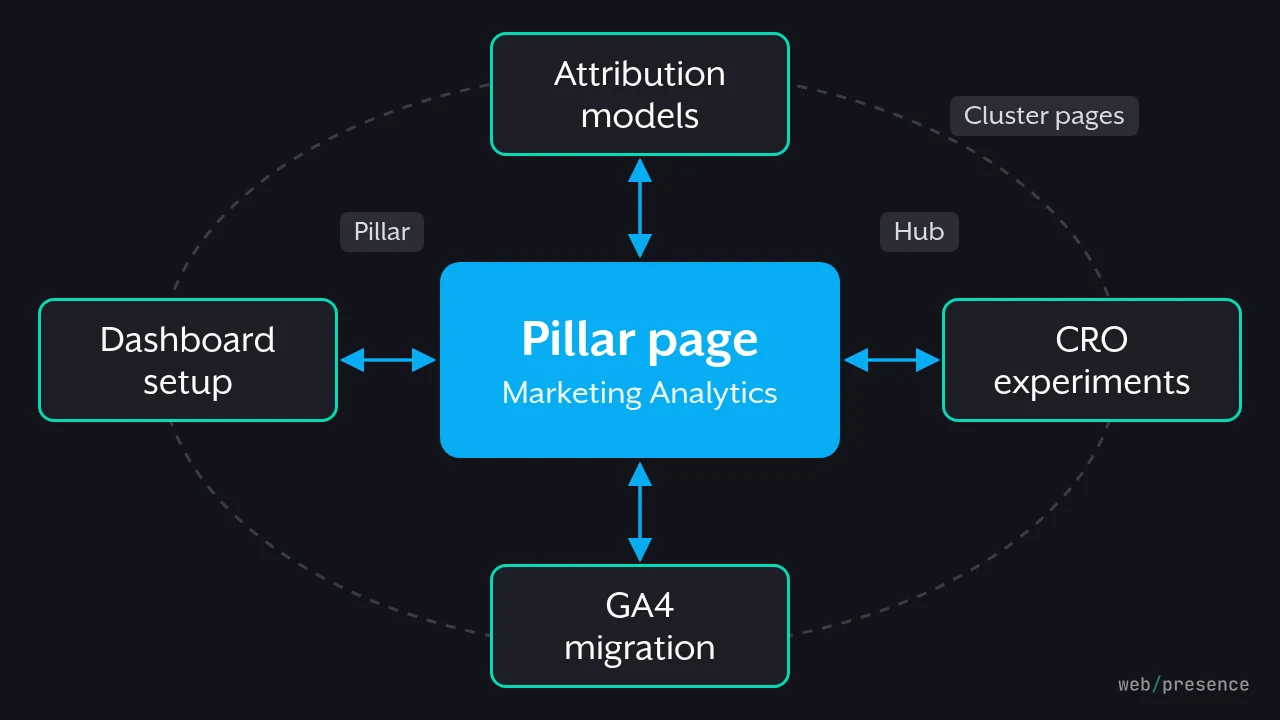
Take a “Marketing Analytics” pillar. Its cluster articles might cover attribution models, dashboard setup, GA4 migration, and CRO experiments. Each links back to the pillar and to its neighbors where it makes sense, so a reader or a crawler can move between them without hitting a dead end.
Why do pillar pages matter for SEO strategy and topical authority?
By organizing content around themes, pillar pages help search engines understand your site structure, cut down keyword cannibalization, and concentrate authority on the topics you care about most. Without them, several blog posts often chase the same topic and split the ranking signals between them.
Keyword cannibalization happens when two pages or more target the same keyword and send mixed signals about which one should rank. A topic cluster prevents most of it because every page gets a distinct job: the pillar owns the broad term, and each cluster page owns a narrower one.
Pillar pages also give a content marketing team a roadmap: once the pillar is live, you know which related blog posts to write next for that content pillar.
The link to topical authority is direct. Covering a subject across more pages and linking them tightly shows search engines a site that knows the topic, which we cover in our guide to building topical authority with the Bigfoot strategy. Google’s own link best practices state that “Google uses links as a signal when determining the relevancy of pages and to find new pages to crawl.”
AI search adds another reason. Ahrefs argues that content pillars “help you rank in traditional search and increase your chances of getting cited by AI platforms,” because AI systems learn to associate a brand with topics it covers consistently. More on that in our guide to generative engine optimization.
Topic clusters also cover search intent across the funnel, from informational search queries like “what is B2B SEO” to comparison and purchase searches. Readers scan the pillar and click through to a deeper article instead of going back to the search results.
What types of pillar pages can you create?
The main pillar formats are the guide, the “what is” page, the how-to, the list or resource page, and the product or service page. Each fits a different search intent and funnel stage. Three of the most common are guides, what-is pages, and how-tos.
Choose the format based on how your target audience searches and what the page needs to achieve for the business.
Guide pillar page
A guide pillar page gives a full overview of a topic. It is long form content, often several thousand words, and suits a broad topic like “Healthcare SEO: Complete Guide for 2026.” Guides tend to target broad, high-volume terms.
“What is” pillar page
A what-is pillar page defines a topic and explains its parts. It is shorter than a guide but still thorough, and works for terms like “What Is a Customer Data Platform?”
How-to pillar page
A how-to pillar page walks through a process step by step. Think “How to Build a B2B Content Strategy,” with frameworks, timelines, tools, and checklists. This format fits mid-funnel search intent well.
List or resource pillar page
A resource pillar collects skimmable lists and curated links, such as “27 CRO Experiments for SaaS in 2026.” Resource pillar pages link to useful internal resources and outside sources, and they fit comparison-style searches.
Product or service pillar page
A service pillar focuses on what you sell and the questions customers ask about it, for example “Paid Media Services for DTC Brands.” It pairs education with calls to action and supporting cluster content. It is a commercial page that still works as relevant content.
How do you choose a content pillar topic and primary keyword?
Before you create a pillar page, pick the topic carefully. The best pillar page topic sits where business value, audience demand, and realistic ranking difficulty overlap. High search volume alone is not enough. The topic has to connect to what you sell, and you have to be able to rank for it today.
A simple three-step approach:
- Mine your own data. Sales calls, CRM notes, and support tickets show which questions about a particular subject come up again and again. That shows which core topic your target audience actually wants answered first.
- Check search intent and volume. Use keyword research tools to pick the main keyword for the pillar, such as “B2B SEO strategy,” plus variations, long tail keywords, and low keyword difficulty terms to spread across the cluster. Match the angle to the intent behind what already ranks in search engine results. Our walkthrough of modern keyword research covers this step in more depth.
- Study who ranks now. Look at the pages already ranking for the same topic, note what they leave out, and find specific keywords they miss. Those gaps often become your first cluster articles.
A travel brand might build a pillar on “Europe Travel Itineraries” with clusters on 7-day Italy trips, budget Scandinavia, and family-friendly routes. A healthcare brand could build one on “Telehealth Regulations in the US” with clusters on HIPAA compliance, state-by-state laws, and reimbursement.
How should you structure your first pillar page?
Structure matters as much as length. A well structured pillar page uses a clear hierarchy, descriptive headings, and a logical order, so both people and algorithms can follow it. Readers should be able to jump straight to their subtopic and find a link to go deeper.
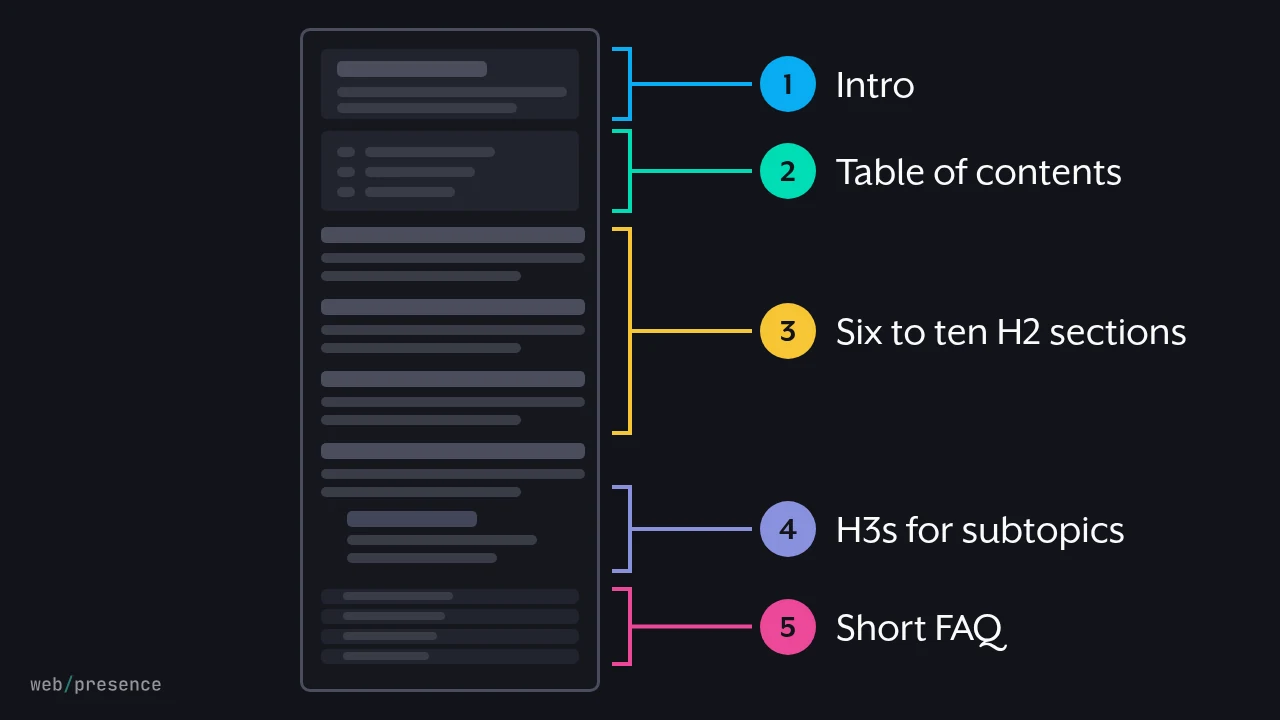
A layout that works:
- An intro of one or two paragraphs that names the problem
- An anchor-linked table of contents
- Six to ten H2 sections, one per sub-intent
- H3s where a subtopic needs more room
- A short FAQ near the end
Put the target keyword in the page title, the URL, the opening paragraph, and at least one subheading. Keep keyword density natural and use related terms and variations in the rest of the text.
Open each section with a short paragraph, follow it with bullets or short paragraphs, and link to the matching cluster article with descriptive anchor text. Simple diagrams and short summary boxes make the page easier to read.
How do you plan topic clusters and cluster content around your pillar?
Map every supporting page before the pillar launches, because planning has to come before writing. The UK SEO Handbook puts a typical cluster count at 4 to 8 pages for narrow technical topics and 8 to 15 for broader ones.
A practical mapping exercise:
- List 10 to 30 questions your audience asks about the core topic.
- Group them into cluster topics. Each group becomes its own article, case study, or landing page with its own specific keywords and search intent.
- Prioritize. Fill the main informational gaps first, then mid-funnel comparisons, then bottom-funnel pages tied to your offers.
If you need a framework for matching each page to a buyer stage, our guide to content mapping lays one out.
Here is an example cluster map for a pillar on “Content Marketing Strategy for SaaS”:
| Cluster page | Intent | Priority |
|---|---|---|
| How to build a SaaS editorial calendar | Informational | High |
| SaaS content marketing vs. paid media | Comparison | Medium |
| Measuring content ROI for SaaS | Evaluative | High |
| Content distribution channels for B2B SaaS | Informational | Medium |
| Case study template for SaaS content | Bottom-funnel | Lower |
Each of these spokes links back to the pillar and covers the topic from a narrower angle. Map all the cluster pages before your team starts drafting multiple blog posts in parallel, or you will end up with overlap.
How do you add internal links to support site structure?
Internal linking means linking between related pages on your own site so search engines can see how they relate and authority can flow between them. Without those links, a pillar is just a long article. The pillar links out, each cluster links back, and related clusters link to each other.
A simple rule set:
- The pillar page links to every cluster article with descriptive anchor text, never “click here.”
- Every spoke links back to the pillar, ideally near the top.
- Related clusters link to each other where it helps the reader.
Also link to the pillar from your navigation, footer, and older posts on the topic so it carries weight in your site structure. Google’s documentation describes good anchor text as “descriptive, reasonably concise, and relevant to the page that it’s on and to the page it links to.”
Build audits into your internal linking strategy. A quarterly check catches new cluster content that never got linked. Whenever you publish a related blog post, or even a typical blog post that touches the pillar page topic, go back and add internal links in both directions.
How do you build a pillar page that ranks, step by step?
A marketing team can create a pillar page in about four weeks by working through planning, drafting, optimization, and launch in order. Treat it as a keyword strategy and site structure project, not only a content creation task. Give each week a clear owner.
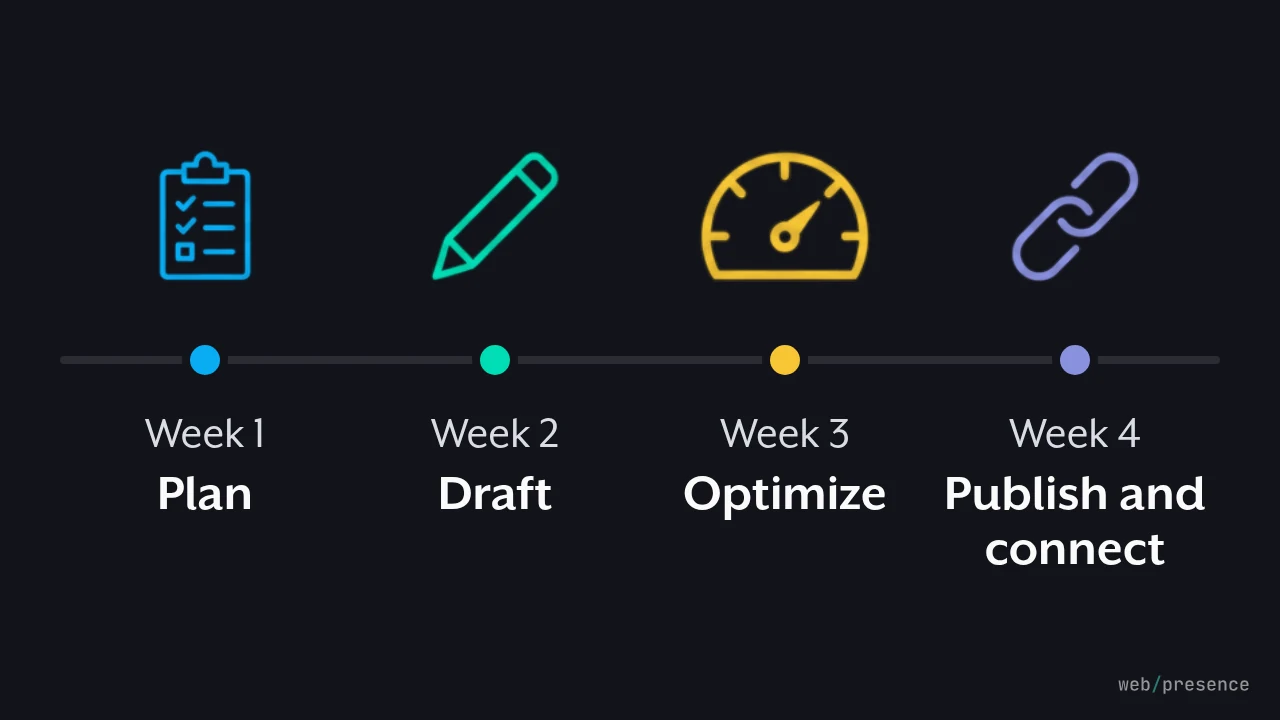
Week 1: Plan
- Define the content pillar and the target keyword.
- Research search intent, competitive keywords, and how well the current results cover the topic.
- Plan 10 to 20 cluster topics, each with assigned search queries.
- Finalize an outline with clear H2 and H3 headings.
Week 2: Draft
- Write for full coverage, not word count. A pillar should give a comprehensive overview without filler.
- Expect a single pillar page to read differently from a typical blog post. It has a broader scope, more sections, and more links to internal resources.
Week 3: Optimize
- Handle on-page SEO: meta title, meta description, and headings that include the target keyword.
- Add image alt text and schema markup, such as FAQPage schema, where it applies.
- Check page speed and mobile layout.
- Add calls to action that support the business goal of the page.
Week 4: Publish and connect
- Link to existing content and to every planned cluster article.
- Add conversion points such as downloadable guides or demo offers.
- Track page performance from day one.
Done this way, the pillar becomes a long-term asset, not a one-off pillar post.
How do you measure pillar page performance?
Track organic traffic, rankings for the pillar keyword and subtopics, referring domains, engagement, and assisted conversions, then update the page on a regular schedule. A pillar page is an ongoing asset, and the ones that keep ranking are the ones that get revisited as the topic changes.
Core metrics to watch:
- Organic traffic to the pillar page
- Rankings for the main keyword and subtopics
- Referring domains, since thorough pillar pages tend to attract links
- Scroll depth and engagement
- Assisted conversions and content-assisted leads
Use analytics and Search Console data to find sections where readers drop off. Then tighten the writing, add internal links, or fill gaps with new cluster articles. Review quarterly, especially in SaaS and healthcare, where products and regulations change often. A regular content audit is a good time to do it.
As your business grows, add new cluster content and link it into your topic clusters. Building topical authority adds up over time.
FAQ about pillar pages and topic clusters
How many pillar pages should my site have?
Most brands can start with three to eight pillar pages, each tied to a major product line, problem, or core topic. Depth and interlinking matter more than the count. Start with one, prove the model, then expand. A single pillar done well will do more for search engine rankings than a dozen thin ones.
Can I turn existing content into a pillar page and clusters?
Yes, and it is often the fastest way to create a pillar page. Audit your existing content, group articles by topic, and build on the strongest piece. Merge or redirect overlapping posts so you don’t have pages competing for the same keyword. Then rework the links so the new pillar sits at the center. You keep the blog content you already have.
Should pillar pages be gated?
Keep the pillar page itself ungated so it can earn organic traffic, links, and search visibility. Gate deeper assets such as templates, checklists, or reports, and link to them from inside the pillar as optional internal resources. You collect leads for your digital marketing programs without hiding what search engines need to read.
Can a pillar page be a commercial page instead of blog content?
Yes. A pillar page can be educational, commercial, or a mix. Many good pillars sit between blog posts and product pages, explaining use cases, integrations, and ROI while linking to detailed cluster pages and conversion pages. A resource pillar and a service pillar work differently, but both can establish topical authority and lift overall SEO performance.
How long does it take a pillar page to rank?
It depends on your site’s authority, the competition for the main keyword, and how quickly you publish and link the cluster pages. Plan on months, not weeks. Track rankings for the cluster terms as well as the pillar keyword, since narrower terms often move first.
Next step: talk with WebPresence about your pillar pages
If you want to create pillar pages but need help choosing topics, mapping cluster content, and setting up measurement for a content pillar strategy, our Content, SEO & AIO team can help. Get in touch to talk through your keyword strategy, your existing content, and where pillar content fits in your wider digital marketing plan.